- Use an sqlite database for the dictionaries. This significantly reduces memory use, and speeds up turn-on time.
- Multiple dictionaries can now be installed at the same time. Use ENTER, SHIFT or keys 1 to 9 while the popup is visible to cycle though the available dictionaries. The Options window can be used to set the order in which the dictionaries are shown.
- Added a Download button in the Options:Dictionaries window.
- Use the K key to make the popup stick(ier) and not hide it immediately. This should make it easier to select the content of the popup for copying to the clipboard. Thanks to Zork Zero for his help.
- Added option "always enable at startup" under Options:General:Enable Mode.
- Save string settings in Unicode. Thanks to Zork Zero.
- Use default create mode when saving to a file to make it more compatible with Windows XP. Thanks to Andrew W.
- The "D" key can now be used to hide the word's definition and show only the readings as a hint. This setting is also available in Options:Dictionaries. It does not affect copied/saved entries.
- Work-around problem getting path in Firefox 3.7a6.
Firefox
Rikaichan 2.00
Version 2.00
Rikaichan 1.08
Changes:
- Fixed: Status bar icon transparency (new icon was also repacked in 1.07a).
- Fixed: Position was wrong when document was zoomed. Thanks to Zork Zero for his help.
- Fixed: Position may be wrong when over a listbox.
- Added: Option to disable the mini help display.
Rikaichan 1.06
Changes in 1.06
- Fixed: "undefined entity" error when viewing some files. When this happens, the word is highlighted, but nothing is displayed.
- Fixed: 'Exception: TypeError: document.getElementById...' in Thunderbird 3.0b2.
- Now installs in SeaMonkey. Thanks to Alfredo F.
- Added option to disable keys in Preferences:Keyboard.
The Middle Mouse Button
This is a very simple Firefox extension that will allow you to use the middle mouse button as a Go Back button. At the end of the browser history, it can also close the current tab.
Note: Some mouse drivers will set the middle mouse button to act as something else by default. You will need to disable that feature if you want to use this extension.
Download / Install
Note: Some mouse drivers will set the middle mouse button to act as something else by default. You will need to disable that feature if you want to use this extension.
Download / Install
rikaichan 1.05
Changes in 1.05
»Download
- Tweaked lookupbar search.
- Adjust document size setting is now off by default.
- SELECT/OPTION elements are now translated in Firefox 3.
- Cleaner results when over RUBY elements, thanks to Akira.
- Entries with multiple kana readings, but the same kanji and definition are now folded into one line.
- Fixed (adj-i) entries were not detected properly.
- Tweaked popup position.
- Can now be enabled for the "current tab," "current browser" (default) or "all browsers." Go to Options:General to change this setting.
- Added rules for -chau.
- Added Henshall index in the kanji dictionary.
- Key "Y" moves the popup 20 pixels down temporarily.
- Key "B" moves the selection back 1 character, "N" moves the selection forward 1 word (longest matched), "M" moves the selection 1 character forward. Note: This only works *within the current element*.
- Now installs in Firefox 3.1 and newer Thunderbird 3 betas.
»Download
TruncFix 1.03
TruncFix is a Firefox extension that provides a quick n' dirty workaround to the problem of filenames with spaces being truncated on some sites that produce an unquoted content-disposition header.
Download: truncfix.xpi
Requires: Firefox 1.0 - 2.0+
rikaichan
About
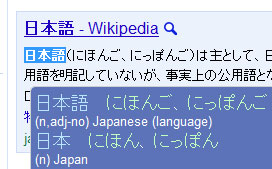
rikaichan is a popup Japanese-English/German/French/Russian dictionary extension for Firefox, Thunderbird and Seamonkey.
Features:
rikaichan is a popup Japanese-English/German/French/Russian dictionary extension for Firefox, Thunderbird and Seamonkey.
Features:
- Simple to use, just hover the mouse on top of a Japanese word.
- Automatically de-inflects verbs and adjectives.
- Has an optional toolbar that allows you to manually type the word to lookup.
- Detailed kanji view shows meaning/keyword in English, on/kun readings, and other information.
- Hiragana, katakana and half-width katakana are treated the same making it possible to lookup stylized/e